 PixOrg
How to make a video from photos with music on Android
Turn a trip or a birthday into a short vertical movie with a song from your own phone, saved to your gallery, in a couple of minutes and for free.
A birthday is sixty photos nobody will scroll through in a chat. The same sixty photos as a one-minute movie with the right song gets watched to the end, twice. Making one has always meant a video editor, a template, a watermark unless you pay, and an evening.
The job is small: pick the photos, pick the order, pick a song, press go. Everything else is the editor getting in the way.
The usual ways
- Google Photos makes “highlight videos” on its own and lets you pick photos for one. The music is from its own library; your own song cannot be used, and the result is tied to the app.
- CapCut, InShot and similar editors can do anything, which is the problem. A simple photo movie takes twenty taps, the free version adds a watermark or an ending clip, and the app wants an account.
- Phone galleries (Samsung, Xiaomi) have a “Create movie” or “Highlights” option for a selected album. Worth trying first; the music choice is usually a fixed list.
If you want your own song, a specific order and no watermark, the general answers all cost something.
In PixOrg
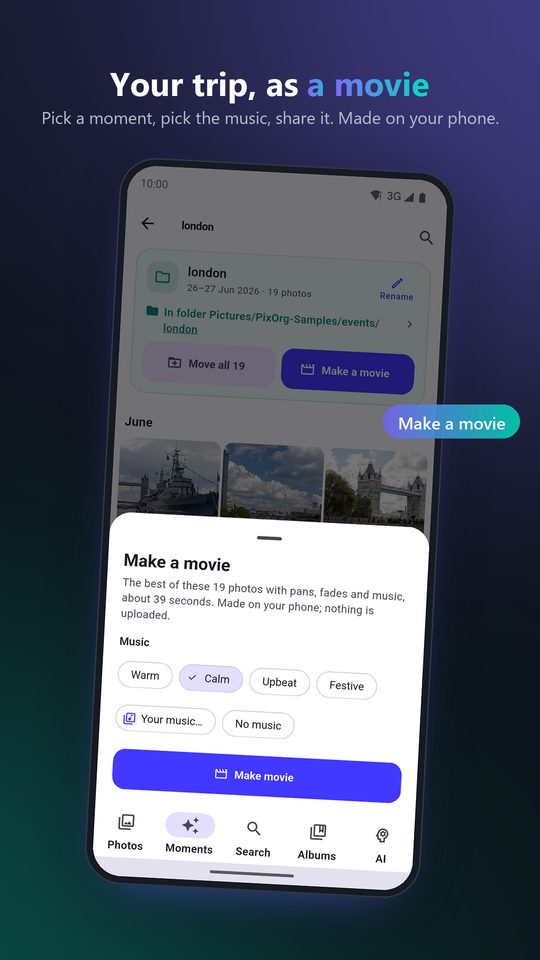
PixOrg makes the movie from a moment or any selection, with any song on your phone, in portrait for sharing, and saves it to the gallery.
- Pick the photos. Either open a moment under Moments and tap Movie, or long-press photos in any grid, tick the ones you want, and tap Movie in the action bar. Search results work too: search “Hampi 2024”, tick, Movie.
- Choose the order: By date, Newest first, As I picked, or Shuffle. The first photo in that order is the title card.
- Choose the music. Pick one of the bundled tracks, or Your music to use any song or video soundtrack on the phone. Drag to where the song should start, so the movie begins at the chorus and not the intro. A short song loops; a long one is faded out at the end.
- Tap Make movie. The sheet shows progress; the movie saves itself to Movies/PixOrg and opens when it is done. Share it from there like any video.
Details worth knowing:
- The movie is 1080 by 1920, portrait, 30 frames a second, the format every chat app and phone plays.
- Each photo appears once, with a slow zoom and drift, and fades into the next. The length follows the number of photos.
- The movie ends on a short “Made with PixOrg” card. You can leave it out by watching one short ad, or with PixOrg Pro. Everything else about movies is free, with no limit on how many you make.
- If you close the sheet while it is rendering, the movie still finishes and saves.
Picking the photos well
A movie from a whole trip is better at thirty photos than at three hundred. Start from the moment, then untick the bursts: PixOrg marks the best shot of each burst with a Best badge in every grid, so keep those and drop the rest. If you have already cleaned up the bursts, the moment is nearly ready as it is.
For a movie about one person, open them under People and pick from their photos, or search “Amma in 2025” and tick the results; the guide to finding every photo of a person explains naming.
Privacy
The movie is rendered on the phone, from your photos and your song, and written to your gallery. No photo and no music file is uploaded. Nothing about the song leaves the phone either; PixOrg does not look up what it is.
PixOrg is free on Google Play
An AI photo gallery for Android that searches, sorts and protects your photos on the phone itself. No account, no cloud, works offline. Free with small ads; PixOrg Pro removes them.
Related guides
- How to move photos out of the Camera folder into folders on Android
Turn one Camera pile of thousands of photos into folders by trip and occasion, without losing a single original along the way.
- How to make a photo collage without cropping on Android
Put several photos on one picture with every photo shown whole, no heads cut off, no fixed squares, and save it as a normal photo to share.
- How to find a photo by describing it on Android
Search your phone's photos the way you would ask a friend, "the red temple at sunset", without uploading them anywhere.