 PixOrg
How to find every photo of one person on Android
Group the faces in your gallery on the phone itself, name someone once, and then search "Maya at the beach" like any other photo.
A grandparent asks for photos of the baby. You want the pictures of your mother from the last trip for her birthday. Ten years of a phone’s camera is somewhere between five and fifty thousand photos, and the ones with a particular person in them are scattered through all of it.
Grouping photos by face is the feature that solves this, and it is the feature that most often is not there when you look for it.
What already groups faces
- Google Photos groups faces well and lets you name them, but only for photos it has backed up. Face grouping is also switched off in some countries and regions, and when it is off there is nothing to turn on. The matching happens on Google’s servers.
- Samsung Gallery and some other phone galleries group faces on the phone. Pixel’s Photos app is Google Photos. Xiaomi’s gallery has a People album in some regions and not in others.
- Nothing else on a typical phone does it. Files and most third-party galleries do not look at faces at all.
If face grouping is available to you and your photos are backed up, use it. If it is not, or your photos stay on the phone, you need an app that does the grouping there.
In PixOrg
PixOrg finds faces and groups them as part of reading your library. The models run on the phone. Nobody is named until you name them.
- Open PixOrg, tap AI, then People. Groups appear as the library is read, newest photos first. Anyone who appears in a few photos gets a tile.
- Tap a tile to see that person’s photos. Tap the name at the top to give them one: “Amma”, “Maya”.
- From now on the name works in Search: “Maya at the beach”, “Amma in 2024”, “Maya and Ravi”. Dates and places combine with it.
- From any person’s page, long-press photos to share them, make a movie of them, or move them into a folder.
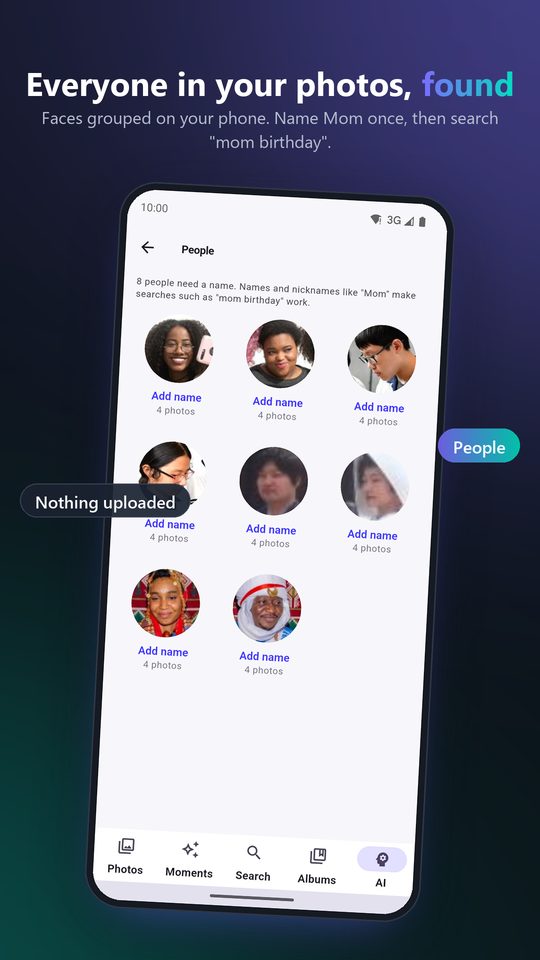
Grouping is never perfect, so there are three ways to correct it, all on the person’s page:
- Same as… when one person has been split into two tiles. Pick the other tile and they become one.
- Not Maya when a photo in the group is someone else. Tick the photos, tap it, and those faces leave the group. You can also move them to another person, or make a new one.
- Hide for a person you do not want on the People page. The photos stay in the library.
Named people are never merged or dissolved by PixOrg on its own, so a correction you make stays made.
Who gets left out
A few kinds of face are deliberately not grouped, because they would make a mess of the People page:
- Idols, statues, paintings and sketches. A shelf of god pictures is not a person.
- Faces in screenshots, receipts and other documents.
- Small faces, far-away faces and blurred faces. They are kept, so a search still finds the photo, but they do not form a person on their own. A crowd photo with many faces joins the people already known in it and never starts a new one.
Someone who appears in only one or two photos does not get a tile either. The page shows people who appear often; the rest are reachable by search once named.
Privacy
Face grouping is the most personal thing a gallery does, which is why it should not happen on someone else’s computer. In PixOrg the face models run on the phone, the groups and names live in PixOrg’s own database there, and nothing about a face is sent anywhere. There is no account to tie a name to. The free version shows small ads under the grid; the ad network sees an advertising ID, never a photo, a face or a name.
PixOrg is free on Google Play
An AI photo gallery for Android that searches, sorts and protects your photos on the phone itself. No account, no cloud, works offline. Free with small ads; PixOrg Pro removes them.
Related guides
- How to find a photo by describing it on Android
Search your phone's photos the way you would ask a friend, "the red temple at sunset", without uploading them anywhere.
- How to make a video from photos with music on Android
Turn a trip or a birthday into a short vertical movie with a song from your own phone, saved to your gallery, in a couple of minutes and for free.
- An offline photo gallery for Android, with search and people
What you lose when Google Photos backup is off, and how to get search, people and memories back without sending a photo anywhere.