 PixOrg
An offline photo gallery for Android, with search and people
What you lose when Google Photos backup is off, and how to get search, people and memories back without sending a photo anywhere.
Plenty of people turn Google Photos backup off, or never turn it on. The free space ran out, the photos are of other people’s children, the work phone is not allowed to, or it is simply nobody’s business. The photos stay on the phone, which is what was wanted.
What is less obvious is how much of the gallery stops working at the same time.
What goes with the backup
Google Photos does nearly all of its thinking on Google’s servers. A photo that has not been uploaded is a file it can show, and not much more. With backup off:
- Search by content (“beach”, “dog”, “receipt”) finds only uploaded photos.
- People and face grouping do not see the local photos.
- Memories and the “this day in” cards are built from the backed-up library.
- Text in photos is not read.
The phone’s own gallery app usually fills some of the gap. Samsung Gallery searches a fixed set of labels and groups faces on the phone; Xiaomi’s and others do less. None of them read the text in photos, and they tend to lose their albums and face names when you change phone brand.
What an on-device gallery can give back
The models that recognise a beach, a face or a word in a photo are small enough to run on a phone now. An app that ships them can do most of what the cloud did, without the cloud. The trade is time: reading ten thousand photos on the phone takes a while, in the background, whereas a server has already done it.
PixOrg is such an app. Everything below runs on the phone.
- Search in your own words. “Birthday cake with candles”, “red car in 2024”, “receipts from March”. The text inside photos is read too, so a screenshot is found by a word on it. See searching by description.
- People. Faces grouped on the phone; name someone once and the name is searchable. See finding every photo of a person.
- Moments. Your photos grouped into days, trips and festivals, named from what is in them: “Diwali”, “Day out in Mysuru”, “With Amma”. A home-screen widget shows what happened on this day in earlier years.
- Receipts, whiteboards and screenshots on their own pages, out of the way of the real photos.
- Declutter for duplicates, old screenshots, forwards and blurry shots, with you deciding what goes.
- A vault, folders, ratings and tags that are written into the photo files, movies with your own music.
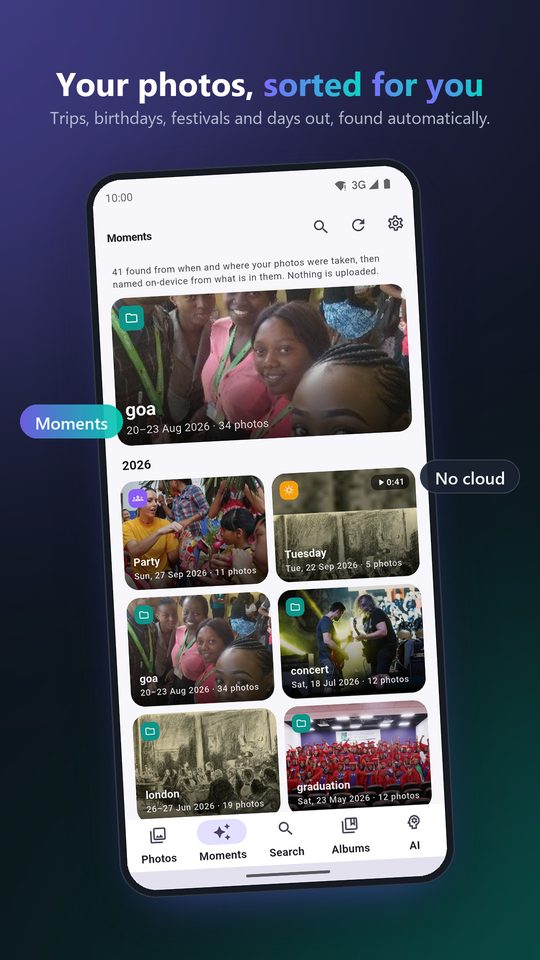
Reading a library the first time is the slow part. PixOrg starts with the newest photos, so last month is searchable within minutes, and works through the older years in the background; on a big library it asks before it reads each older year. It waits while you are on a call and gives way to whatever you are doing.
What it does not do
PixOrg is not a backup. The photos are on the phone and nowhere else, exactly as they were. If the phone is lost, so are they, unless you copy them somewhere yourself: a PC over USB, an SD card, a NAS, or a cloud you trust with them. Any of those works, because PixOrg leaves your files where they are and as they are.
PixOrg’s own data, the ratings, tags, people, names and moments, can be saved to one file and restored on a new phone. There is a guide to that.
Privacy
Nothing about a photo leaves the phone: not the picture, not the text read from it, not a face, not a name, not a search. There is no account and no sign-in. The free version shows small Google ads under the grid; the ad network sees an advertising ID and an approximate location from the connection, never a photo. PixOrg Pro removes the ads. The privacy policy lists exactly what the ad SDK sees, which is the whole list.
PixOrg is free on Google Play
An AI photo gallery for Android that searches, sorts and protects your photos on the phone itself. No account, no cloud, works offline. Free with small ads; PixOrg Pro removes them.
Related guides
- How to find a photo by describing it on Android
Search your phone's photos the way you would ask a friend, "the red temple at sunset", without uploading them anywhere.
- How to find every photo of one person on Android
Group the faces in your gallery on the phone itself, name someone once, and then search "Maya at the beach" like any other photo.
- How to move your photo ratings, people and albums to a new phone
Save everything you taught your gallery app, names, ratings, tags, moments and the vault key, to one file, and bring it back on a new phone or after a reinstall.